Conversational UX for AI & LLMs
Raízen Smart Contact: Elevating HR via WhatsApp
Automating HR on WhatsApp for the person with the lowest digital literacy - 14 skills shipped in 6 months. This case study focuses on the core journey: Onboarding & Authentication → Payslip Delivery.
Year :
2022
Industry :
Energy and Renewables
Client :
Raízen
Project Duration :
6 months
Metric: CES 71%
🎯 The problem nobody wanted to queue for
Squad: Me + 1 PM + 1 Analytics/Insights + 4 Engineers ·
Scope: 14 skills shipped.
This case study focuses on the core journey: Onboarding & Authentication → Payslip Delivery.
Raízen runs on people who are rarely at a desk: fuel station teams, industrial staff, field workers whose whole day happens away from a computer. Their HR support still worked like everyone had one — physical desks, phone queues, in-person visits. If you needed a payslip or a simple answer, you had to stop what you were doing and go find it.
The objective: move HR onto WhatsApp, make it faster and more accurate than the old way, and build something people would actually use.
🧭 Meeting Maria before designing anything
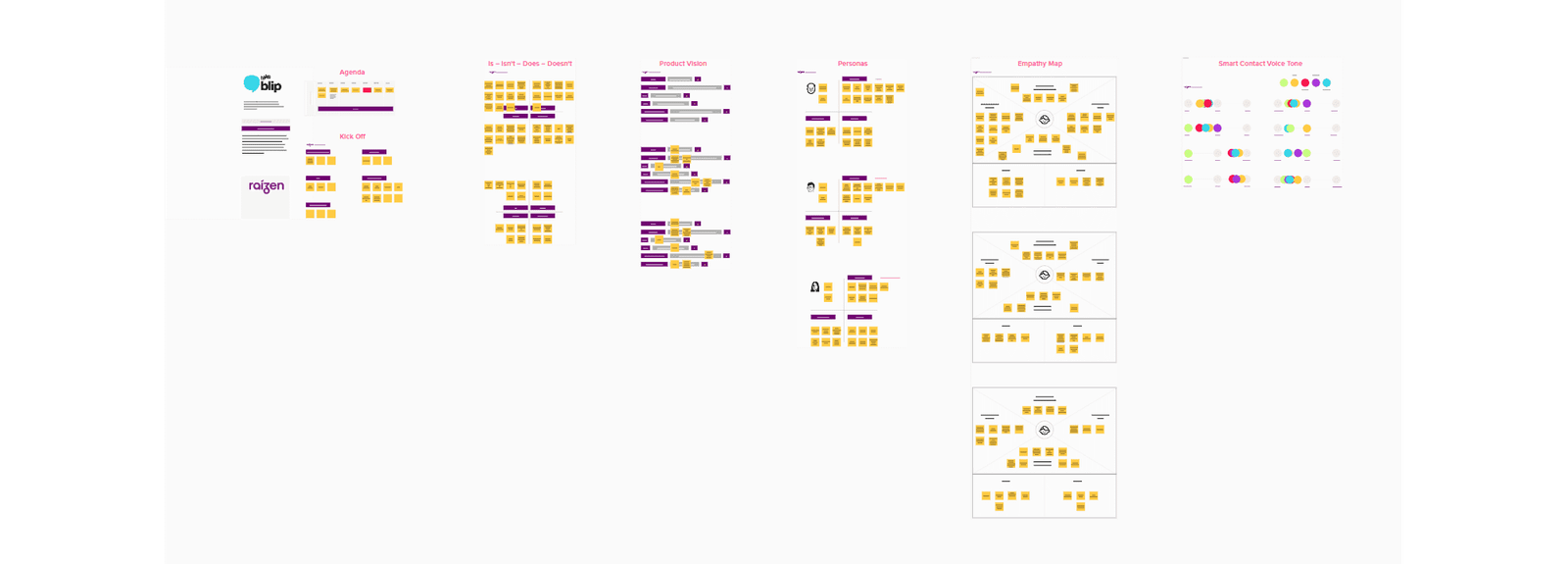
Before any flow got drawn, I facilitated a Lean Inception myself, remotely on Mural, with an HR Manager, the PM, and engineering in the same session. The goal was to get business and engineering to agree on who we were building for, before anyone debated features. We left with a product vision, an Is/Isn’t/Does/Doesn’t framing, three personas, empathy maps, and a voice & tone for the assistant.
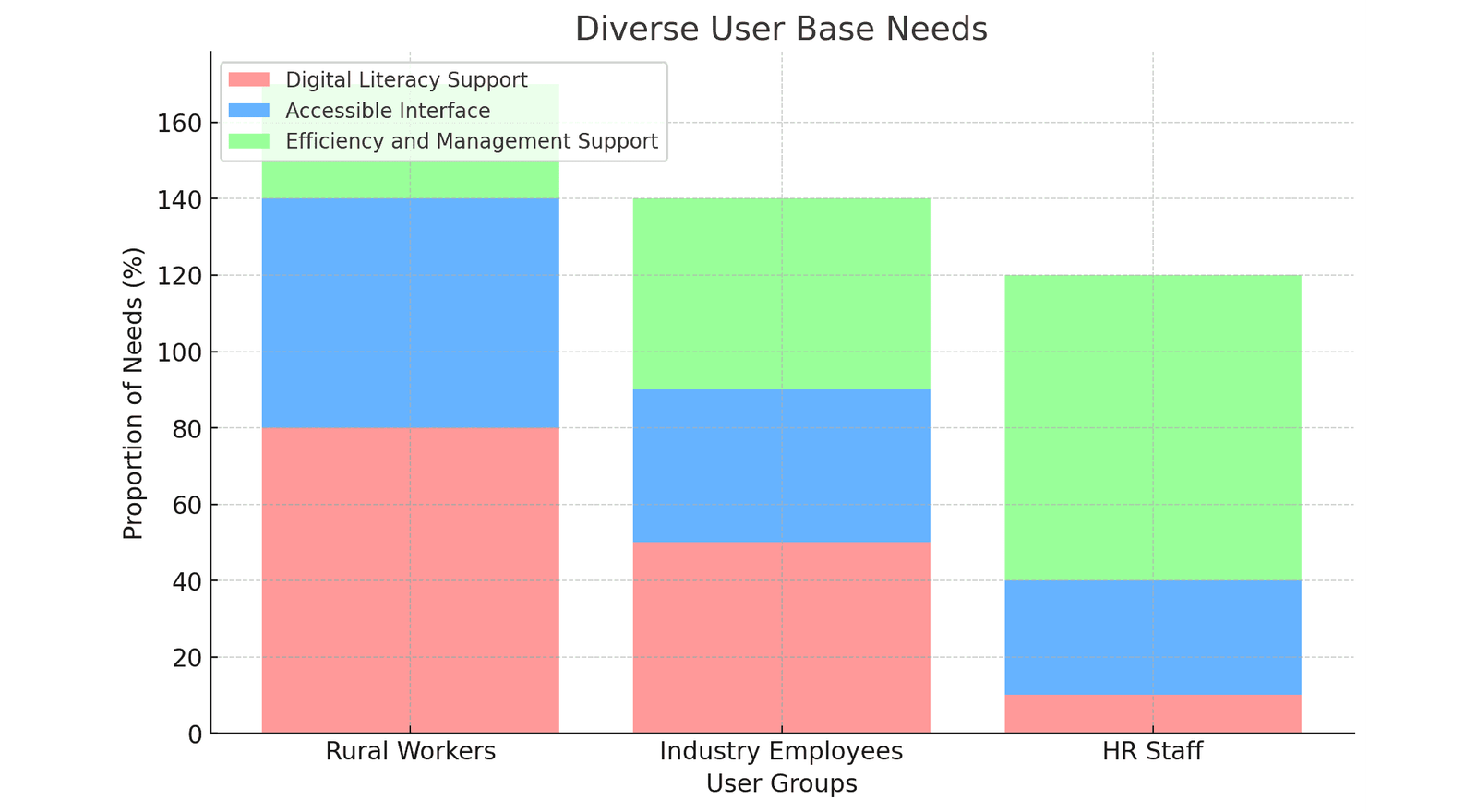
That process surfaced a harder question: we didn’t have one user, we had three, and they didn’t agree on what “good” meant.
Administrative staff wanted maximum detail. They live inside HR processes.
Industrial workers wanted speed. They’re always on the clock between shifts.
Rural/field workers, represented by a persona we called Maria, had the lowest digital exposure, unstable mobile signal, and WhatsApp as her entire digital toolkit.
The PM and I made a call that shaped everything downstream: design for Maria.
She was the hardest case, low literacy, weak signal, zero patience left after a field shift. Solve for her constraints and the experience gets simpler for everyone else. I never met Maria, but her daily reality shaped almost every decision we made.
💬 The friction was hiding in the conversation itself
Looking at existing HR chatbots with the PM, we found the real source of drop-off. A user types “I need my receipt.” The bot replies, “Hi! How can I help you today?” The system already had what it needed, and asked the user to say it again anyway.
That pattern reframed the whole project. We stopped optimizing for satisfaction scores and started optimizing for effort, because for someone like Maria, effort decides whether she ever opens the chat again.
Building the Short-Circuit Flow
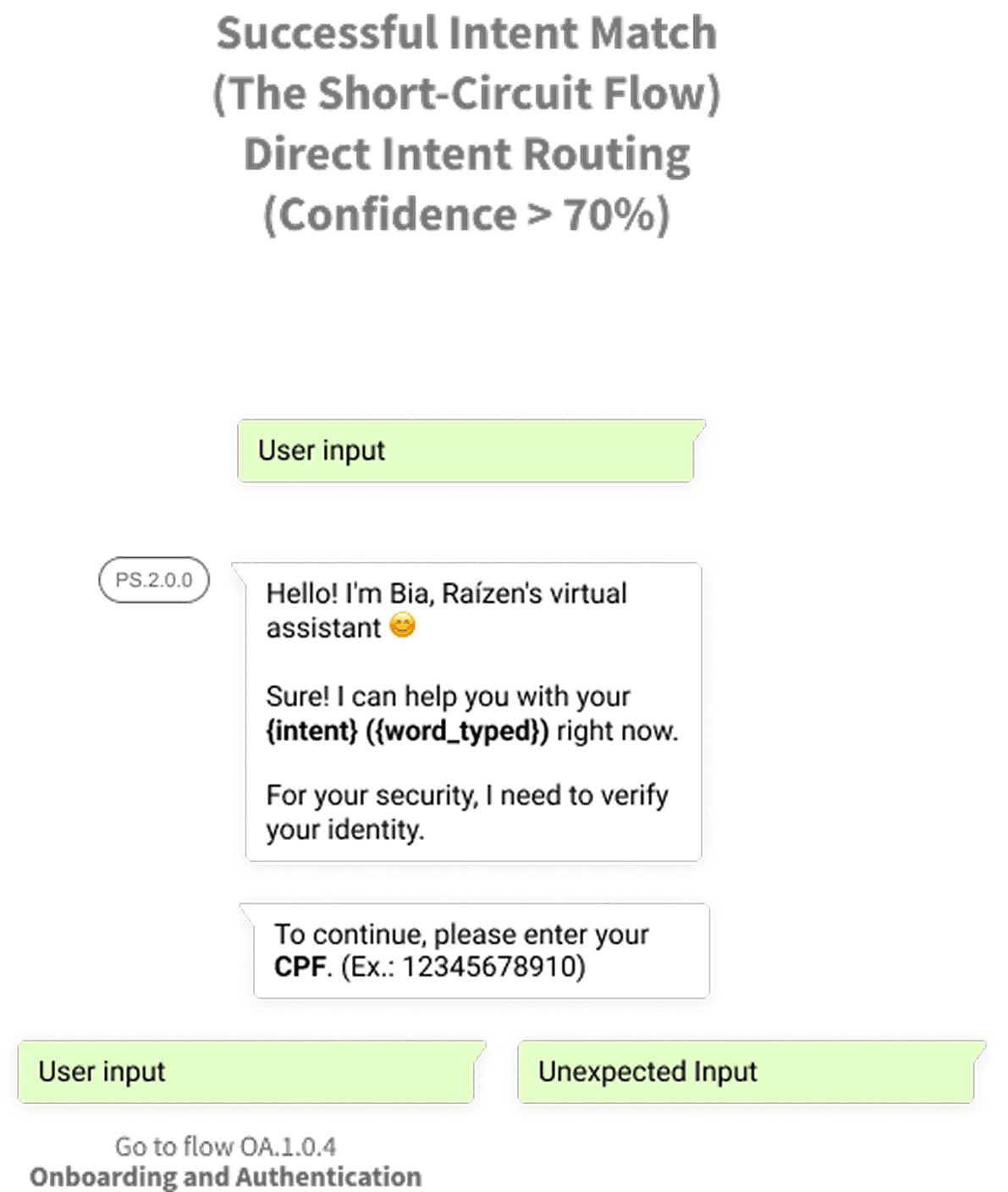
The fix: stop making users walk through a menu they didn’t need. When Maria types “I need my receipt from last month,” the system reads intent and entities simultaneously from that first message — intent: retrieve payslip, entity: period = last month, and skips the main menu entirely. No “How can I help you?”
The conversation starts where she is. This was prototyped WhatsApp-native from day one: real bubbles, real quick replies, real language people actually type.
The principle that protected every edge case
Payslips carry sensitive data under LGPD, so authentication wasn’t optional. Early on, the PM and I agreed on one line that became the yardstick for every design review that followed:
“Security should be a pause, not a restart.”
In practice: the system keeps the user’s original intent in memory through the entire verification step. Identity gets checked lightly, a CPF check or SMS token, framed as a checkpoint and the moment she’s verified, the payslip arrives. No re-explaining, no starting over.
Designing for the conversations that don’t go as planned
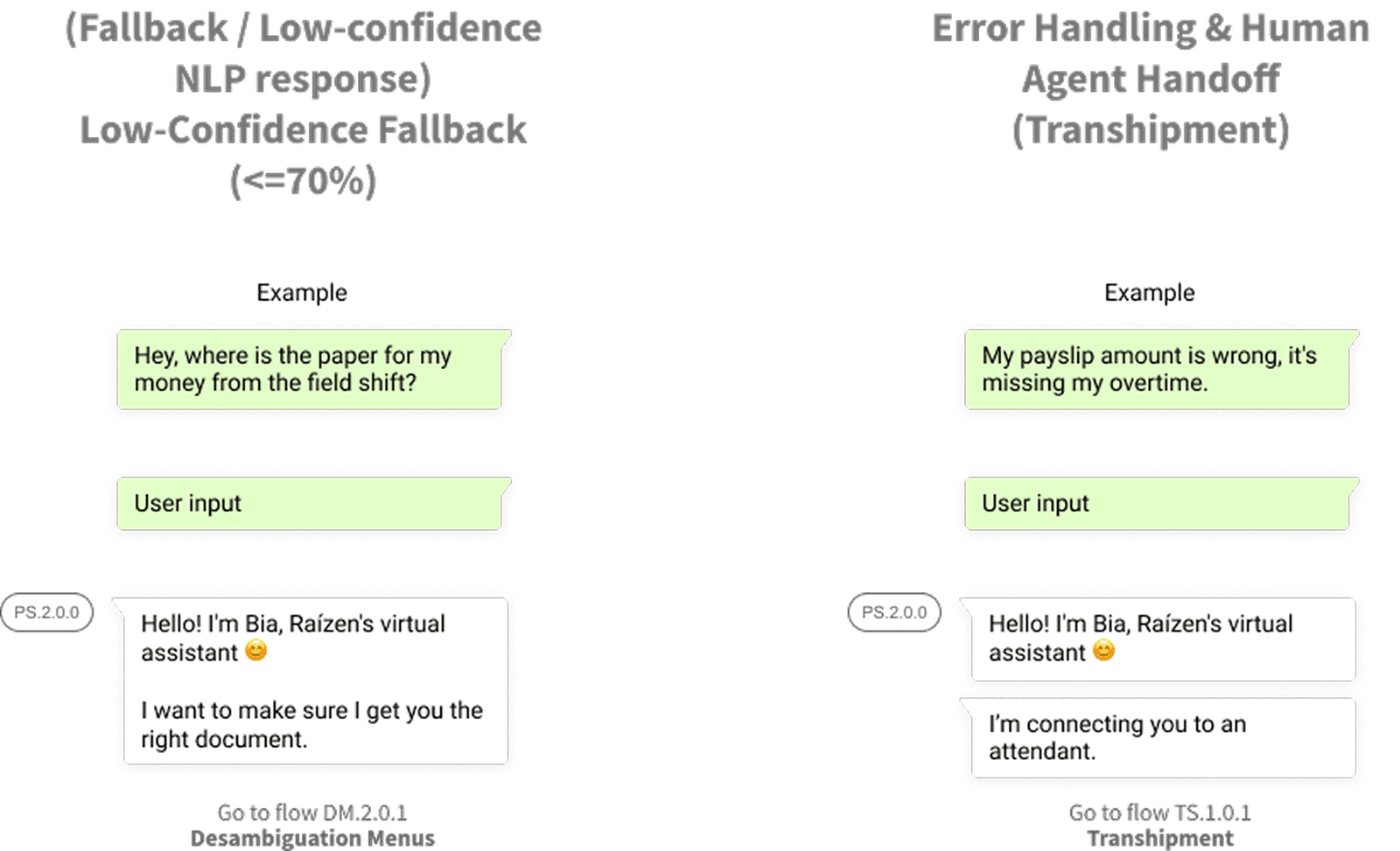
Happy paths are the easy 70% of the work. When the system’s confidence in a message dropped to 70% or below, something like “Where’s my money paper?” it offered a simple disambiguation menu instead of guessing wrong.
When something was genuinely unresolvable, like a payroll discrepancy, there was no loop and no repeated apologies, just an immediate handoff to a human agent in Blip Desk. Every fallback path was mapped with the PM and engineers before a single line was built.
A handoff engineers didn’t have to decode
Every flow left my hands as something engineers could build from directly: versioned flow documents per skill, a shared block ID system, inline API annotations, and a regex spreadsheet documenting every disambiguation trigger. Around it sat a ritual of weekly flow reviews with the PM and all four engineers, then a full design QA pass on the live bot before anything shipped.
What effort-first design produced
71% Customer Effort Score, held consistently across all three audiences, from rural field workers to admin staff. That consistency confirmed the original bet: keeping context, cutting repetition, and treating verification as a pause instead of a restart showed up directly as lower effort, for everyone.
Back to Maria
She wanted her payslip, confirmation her pay was right, and to go home. What we built was a conversation that never made her repeat herself.
Learning Session & Key Takeaways
Reflecting on the 6-month development of the Raízen Smart Contact, three key strategic pillars emerged as the most significant learning points for scaling conversational products:
1. The Balance of “Frictionless” vs. “Secure” UX
Designing for HR involves handling highly sensitive data (LGPD). I learned that friction isn’t always a negative. By implementing the SMS-based OTP (One-Time Password) flow, we added a necessary layer of security. The challenge was keeping the completion rate high. I discovered that by using Contextual Reinforcement—where the bot remembers the user’s initial intent after authentication—we could maintain a “perceived” frictionless experience even with a “real” security barrier.
2. Designing for the “Extreme” User Persona
Working with Raízen’s rural workforce taught me the importance of Cognitive Load Management. I moved away from open-ended natural language inputs toward structured UI components (WhatsApp List Menus and Buttons). This reduced “input fatigue” and “choice paralysis.” The takeaway: In conversational AI, the best interface is often the one that guides the user most strictly, especially in low-tech-literacy environments.
3. Data as a Design Driver (CES vs. CSAT)
A major evolution in my process was shifting from measuring simple satisfaction to measuring Efficiency. By implementing the Customer Effort Score (CES), we shifted our focus to: “How easy was this?” rather than “Did you like the bot?” This provided much clearer data for iterative design, allowing us to pinpoint exactly which interaction flows needed logic simplification.
4. Scaling through Conversational Components
To maintain consistency across the Onboarding, Payslip, and Vacation flows, I treated the conversational elements as a Design System. Building reusable “Micro-flows” for authentication and error handling allowed us to scale the bot’s capabilities quickly without reinventing the logic for every new HR service added to the menu.
5. Technical Synergy: Designing for API-Driven Architectures
A major technical milestone was developing conversational flows that didn’t just exist in a vacuum but acted as the front-end for Raízen’s Inter-System via API. I learned to design with “Data Constraints” in mind—ensuring that every bot response was mapped to specific system variables. This required a deep understanding of how to translate complex back-end data into digestible, “human-friendly” WhatsApp messages without losing technical accuracy.
6. The Hybrid Support Strategy: Self-Service + Human-in-the-Loop
In the “Personal Information and Benefits” module, I implemented a tiered support model. For informational tasks (viewing current data), the bot provided 100% automation. However, for sensitive data changes, I designed a Seamless Handoff to live agents. This taught me how to balance automation efficiency with the security and empathy required for high-stakes HR changes, ensuring the bot acts as a filter rather than a barrier.
7. Reducing Ambiguity through Disambiguation Logic
Handling complex HR queries like Timesheets and Payslips required more than a simple FAQ list. I engineered Disambiguation Flows to handle intent overlap. If a user asked a vague question, the bot was designed to offer clarifying options rather than guessing. This significantly increased the “Resolution Accuracy” and prevented user frustration, proving that a well-designed conversational flow should mirror a natural, clarifying human dialogue.
SEE THE PROTOTYPE ON YOUR MOBILE
Link 👉 Prototype
🎮 Explore the interactive prototype
Slug
Title
Conversational UX for AI & LLMs
Raízen Smart Contact: Elevating HR via WhatsApp
Automating HR on WhatsApp for the person with the lowest digital literacy - 14 skills shipped in 6 months. This case study focuses on the core journey: Onboarding & Authentication → Payslip Delivery.
Year :
2022
Industry :
Energy and Renewables
Client :
Raízen
Project Duration :
6 months
Metric: CES 71%
🎯 The problem nobody wanted to queue for
Squad: Me + 1 PM + 1 Analytics/Insights + 4 Engineers ·
Scope: 14 skills shipped.
This case study focuses on the core journey: Onboarding & Authentication → Payslip Delivery.
Raízen runs on people who are rarely at a desk: fuel station teams, industrial staff, field workers whose whole day happens away from a computer. Their HR support still worked like everyone had one — physical desks, phone queues, in-person visits. If you needed a payslip or a simple answer, you had to stop what you were doing and go find it.
The objective: move HR onto WhatsApp, make it faster and more accurate than the old way, and build something people would actually use.
🧭 Meeting Maria before designing anything
Before any flow got drawn, I facilitated a Lean Inception myself, remotely on Mural, with an HR Manager, the PM, and engineering in the same session. The goal was to get business and engineering to agree on who we were building for, before anyone debated features. We left with a product vision, an Is/Isn’t/Does/Doesn’t framing, three personas, empathy maps, and a voice & tone for the assistant.
That process surfaced a harder question: we didn’t have one user, we had three, and they didn’t agree on what “good” meant.
Administrative staff wanted maximum detail. They live inside HR processes.
Industrial workers wanted speed. They’re always on the clock between shifts.
Rural/field workers, represented by a persona we called Maria, had the lowest digital exposure, unstable mobile signal, and WhatsApp as her entire digital toolkit.
The PM and I made a call that shaped everything downstream: design for Maria.
She was the hardest case, low literacy, weak signal, zero patience left after a field shift. Solve for her constraints and the experience gets simpler for everyone else. I never met Maria, but her daily reality shaped almost every decision we made.
💬 The friction was hiding in the conversation itself
Looking at existing HR chatbots with the PM, we found the real source of drop-off. A user types “I need my receipt.” The bot replies, “Hi! How can I help you today?” The system already had what it needed, and asked the user to say it again anyway.
That pattern reframed the whole project. We stopped optimizing for satisfaction scores and started optimizing for effort, because for someone like Maria, effort decides whether she ever opens the chat again.
Building the Short-Circuit Flow
The fix: stop making users walk through a menu they didn’t need. When Maria types “I need my receipt from last month,” the system reads intent and entities simultaneously from that first message — intent: retrieve payslip, entity: period = last month, and skips the main menu entirely. No “How can I help you?”
The conversation starts where she is. This was prototyped WhatsApp-native from day one: real bubbles, real quick replies, real language people actually type.
The principle that protected every edge case
Payslips carry sensitive data under LGPD, so authentication wasn’t optional. Early on, the PM and I agreed on one line that became the yardstick for every design review that followed:
“Security should be a pause, not a restart.”
In practice: the system keeps the user’s original intent in memory through the entire verification step. Identity gets checked lightly, a CPF check or SMS token, framed as a checkpoint and the moment she’s verified, the payslip arrives. No re-explaining, no starting over.
Designing for the conversations that don’t go as planned
Happy paths are the easy 70% of the work. When the system’s confidence in a message dropped to 70% or below, something like “Where’s my money paper?” it offered a simple disambiguation menu instead of guessing wrong.
When something was genuinely unresolvable, like a payroll discrepancy, there was no loop and no repeated apologies, just an immediate handoff to a human agent in Blip Desk. Every fallback path was mapped with the PM and engineers before a single line was built.
A handoff engineers didn’t have to decode
Every flow left my hands as something engineers could build from directly: versioned flow documents per skill, a shared block ID system, inline API annotations, and a regex spreadsheet documenting every disambiguation trigger. Around it sat a ritual of weekly flow reviews with the PM and all four engineers, then a full design QA pass on the live bot before anything shipped.
What effort-first design produced
71% Customer Effort Score, held consistently across all three audiences, from rural field workers to admin staff. That consistency confirmed the original bet: keeping context, cutting repetition, and treating verification as a pause instead of a restart showed up directly as lower effort, for everyone.
Back to Maria
She wanted her payslip, confirmation her pay was right, and to go home. What we built was a conversation that never made her repeat herself.
Learning Session & Key Takeaways
Reflecting on the 6-month development of the Raízen Smart Contact, three key strategic pillars emerged as the most significant learning points for scaling conversational products:
1. The Balance of “Frictionless” vs. “Secure” UX
Designing for HR involves handling highly sensitive data (LGPD). I learned that friction isn’t always a negative. By implementing the SMS-based OTP (One-Time Password) flow, we added a necessary layer of security. The challenge was keeping the completion rate high. I discovered that by using Contextual Reinforcement—where the bot remembers the user’s initial intent after authentication—we could maintain a “perceived” frictionless experience even with a “real” security barrier.
2. Designing for the “Extreme” User Persona
Working with Raízen’s rural workforce taught me the importance of Cognitive Load Management. I moved away from open-ended natural language inputs toward structured UI components (WhatsApp List Menus and Buttons). This reduced “input fatigue” and “choice paralysis.” The takeaway: In conversational AI, the best interface is often the one that guides the user most strictly, especially in low-tech-literacy environments.
3. Data as a Design Driver (CES vs. CSAT)
A major evolution in my process was shifting from measuring simple satisfaction to measuring Efficiency. By implementing the Customer Effort Score (CES), we shifted our focus to: “How easy was this?” rather than “Did you like the bot?” This provided much clearer data for iterative design, allowing us to pinpoint exactly which interaction flows needed logic simplification.
4. Scaling through Conversational Components
To maintain consistency across the Onboarding, Payslip, and Vacation flows, I treated the conversational elements as a Design System. Building reusable “Micro-flows” for authentication and error handling allowed us to scale the bot’s capabilities quickly without reinventing the logic for every new HR service added to the menu.
5. Technical Synergy: Designing for API-Driven Architectures
A major technical milestone was developing conversational flows that didn’t just exist in a vacuum but acted as the front-end for Raízen’s Inter-System via API. I learned to design with “Data Constraints” in mind—ensuring that every bot response was mapped to specific system variables. This required a deep understanding of how to translate complex back-end data into digestible, “human-friendly” WhatsApp messages without losing technical accuracy.
6. The Hybrid Support Strategy: Self-Service + Human-in-the-Loop
In the “Personal Information and Benefits” module, I implemented a tiered support model. For informational tasks (viewing current data), the bot provided 100% automation. However, for sensitive data changes, I designed a Seamless Handoff to live agents. This taught me how to balance automation efficiency with the security and empathy required for high-stakes HR changes, ensuring the bot acts as a filter rather than a barrier.
7. Reducing Ambiguity through Disambiguation Logic
Handling complex HR queries like Timesheets and Payslips required more than a simple FAQ list. I engineered Disambiguation Flows to handle intent overlap. If a user asked a vague question, the bot was designed to offer clarifying options rather than guessing. This significantly increased the “Resolution Accuracy” and prevented user frustration, proving that a well-designed conversational flow should mirror a natural, clarifying human dialogue.
SEE THE PROTOTYPE ON YOUR MOBILE
Link 👉 Prototype
🎮 Explore the interactive prototype
Slug
Title